
Common Magento SEO
Mistakes to Avoid
(and How To Fix Them).

Magento is one of the most powerful eCommerce platforms available. Its flexibility, modular architecture, and scalability make it a top choice for eCommerce brands looking to show up on the SERPs. But without careful configuration and maintenance, even a technically strong Magento store can underperform in organic search and miss out on visibility and ultimately conversions and sales.
In this guide, we’ll walk through the most frequent and damaging Magento SEO mistakes, why they happen and how to correct them – with personal insight from me: Hello – I’m Annie, a seasoned SEO expert at Envisage Digital, who has worked extensively on Magento websites. I offer Magento SEO advice through free guides and resources. Let’s get started…

Common Magento SEO Mistakes
1. Messy or Suboptimal URL Structure
Why It’s a Problem
Magento’s default URL behaviour can create long, non-descriptive URLs
(e.g. /catalog/product/view/id/12345). These don’t help users or search engines
understand what the page is about and are unlikely to be rewarded in the SERPs.
Magento can also generate multiple URL paths for the same product when it appears in
multiple categories, which leads to duplicate-content issues.
How to Fix It
- ✔ ︎Enable URL rewrites: Ensure Magento’s URL rewrite feature is turned on so product and category URLs are concise and human-readable.
- ✔︎ Avoid category paths in product URLs Unless your products would only appear in one category disable the “Use Category Path for Product URLs” setting to prevent duplication and overly long URLs.
- ✔︎ Remove unnecessary URL parameters: Filter-generated URLs (e.g. layered navigation) can create many URL variations. Use canonical tags when parameters are required or block via robots.txt.
Here’s my experience with URLs in Magento:
A clean, keyword-rich URL doesn’t just help SEO: it builds trust. When I audit a Magento store and see something like /catalog/product/view/id/6789, I know the URL structure has been neglected, and I immediately flag it as a priority for rewrite. Keywords in the URL are an easy SEO win, so it’s important to grab those opportunities where you can.

2. Duplicate Content from Layered Navigation & Product Variants
Why It’s a Problem
Magento’s layered navigation (filtering by colour, size, price, etc.) improves user experience,
but it can generate countless filter-based URLs that contain near-identical content. When search engines
crawl and index these variations, it leads to duplicate-content issues, diluted link equity, and wasted
crawl budget.
Products that appear in multiple categories can also generate multiple URL paths, creating canonical
conflicts and making it harder for search engines to understand which version should rank.
- ✔ Use canonical tags: Configure Magento to output canonical links on category and product pages to signal the preferred version of each URL.
- ✔ Noindex filter URLs: Apply noindex,follow to layered-navigation URLs so they don’t appear in search results but still pass equity through internal links.
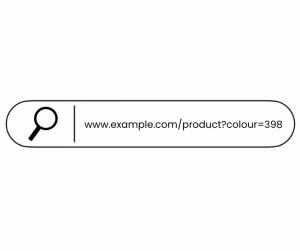
- ✔ Block/filter parameters: Use robots.txt rules to limit crawling of redundant or low-value parameter URLs, for example chain parameter URLs. If canonicals are not being respected, it may be worth blocking other parameter urls e.g 'colour'.
- ✔ Audit regularly: Use tools such as Screaming Frog or Sitechecker to identify duplicate clusters, parameter-generated pages, and canonical mismatches.
Here’s my experience with layered navigation & variants:
In one eCommerce layered-navigation heavy Magento store I audited, filters had generated thousands of nearly
duplicate category pages. After implementing canonical tags and blocking the worst offenders in
robots.txt, crawl efficiency improved significantly. The visibility of the core category pages
increased too.
Canonical tags are fundamental, but I see them misused more often than not. A canonical isn’t a redirect so isn't a rule -
it’s a hint. Ensuring they’re correctly configured and regularly reviewed is non-negotiable in a serious
Magento SEO strategy. And if they aren't being respected by Googlebot, you may have to disallow in robots.txt. For example, the same client (in the very competitive home improvements industry) was wasting a lot of crawl budget on colour parameters, despite proper canonicals. We disallowed the filter 'colour' and resolved the issue.
3. Slow Site Speed and Poor Performance
Why It’s a Problem
Magento is resource-intensive, and if not properly optimised, pages can load slowly due to uncompressed images, excessive JavaScript, inefficient server configurations, or missing caching.
Slow page speed negatively impacts SEO - Google has confirmed that speed is a ranking factor - and user experience, leading to high bounce rates, abandoned carts and reduced conversions.
- ✔ Enable full-page caching: Use Magento’s built-in caching or tools like Varnish/Redis to reduce server response times.
- ✔ Use a CDN: Distribute assets globally with a content delivery network to reduce latency for international users.
- ✔ Optimise media: Compress images, serve next-gen formats like WebP, and implement lazy-loading where possible.
- ✔ Minify and bundle assets: Minify CSS, JS, and HTML and combine files where sensible.
- ✔ Choose a performant host: Select a hosting provider specialising in Magento with optimised PHP versions, fast disk I/O, and robust infrastructure.
- ✔ Monitor performance: Regularly audit speed using tools like PageSpeed Insights, WebPageTest, or Lighthouse to catch regressions early.
- ✔ Switch to Hyvä Magento's Hyvä theme is fast - really fast! Switching to Hyvä can drastically improve your Core Web Vitals from the off.
Here’s my experience with Magento site speed:
On one Magento migration project, speed was the limiting factor, with really poor Lighthouse scores. After implementing full-page caching and optimising assets, the site’s load time improved by 11%. The site later went on for a Hyvä rebuild, where Core Web Vitals showed a 60% increase in loading factors.
4. Weak or Generic Meta Titles & Meta Descriptions
Why It’s a Problem
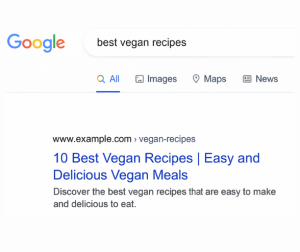
Magento sites often rely on default or templated meta titles and descriptions - or leave them blank entirely.
This can create duplicate meta tags, reduce click-through rates, and miss opportunities to target relevant
keywords. Meta tags are one of the primary ways a page communicates its content to both users and search engines.
Google often pulls through its own metadescription - but it's always worth specifying to include top focus keywords on the hope if it's good enough, Google will prefer yours.
- ✔ Craft unique meta titles and descriptions: Ensure every category and product page has a distinct, compelling title and description. Avoid over-reliance on templates, and include relevant keywords and calls to action.
- ✔ Follow length best practices: Keep meta titles around 50–60 characters and descriptions around 150–160 characters.
- ✔ Use product schema (structured data): Enable schema markup so search engines understand product attributes like price, availability, and reviews, enhancing your listings in SERPs.
- ✔ Automate where necessary: For large catalogs, use an SEO extension (e.g. Mageworx SEO Suite) for dynamic templates, but always manually optimise high-priority or high-value pages.
Here’s my experience with meta tags:
I always advise clients to treat meta data like mini advertising copy. It’s not just for bots: well-written,
unique meta titles and descriptions improve click-through rates, which in turn positively impacts SEO performance (and of course conversions!) I can't tell you how many clients have had random text pulled through which cuts off half way through a sentence on the SERP. It doesn't encourage CTR!
In one simple fix with an outdoor activities client, a metadescription audit and fixes - alongside some solid interlinking - generated a solid 15% increase in CTR.
5. Poor Mobile Experience
Why It’s a ProblemMobile-first indexing is now standard, with Google using the mobile version for ranking signals. If a Magento store isn’t fully responsive or if the mobile version is slow, clunky, or difficult to use, it risks lower engagement, higher bounce rates, and reduced visibility on the SERPS and search rankings.
How to Fix It- ✔ Use a responsive theme: Ensure navigation, images, and forms adapt fluidly across all devices.
- ✔ Simplify mobile navigation: Implement hamburger menus or collapsible filters, and make touch targets easy to tap.
- ✔ Optimise for mobile performance: Compress assets, enable lazy-loading, and use efficient caching.
- ✔ Test on real devices: Using tools like Google’s Mobile-Friendly Test or Inspect on devtools is great, but use a real device to check for overlapping elements, missed CTAs, small text, or slow interactions. Then you can fix issues accordingly.
Here’s my experience with mobile UX:
I once ran a mobile audit on a Magento site that looked fine on desktop, but on mobile the checkout button was buried halfway down the page. Mobile users were dropping off as a result. Simple Magento UX design tweaks improved usability dramatically — a perfect example of where SEO meets CRO for eCommerce stores.

6. Weak Internal Linking & Crawl Architecture
Why It’s a ProblemA Magento site’s internal linking and crawl architecture determine how easily search engines can discover, index and rank your pages. Weak or poorly structured links can lead to orphaned pages, slow indexing, and diluted link equity, ultimately limiting the site’s SEO potential and making it harder for users to navigate.
How to Fix It- ✔ Implement a clear internal linking strategy: Ensure category pages, subcategories, and key products are well-linked throughout the site.
- ✔ Use breadcrumb navigation: Help users and search engines understand the hierarchy of your store.
- ✔ Audit for orphaned pages: Identify pages with few or no internal links and incorporate them into the site’s structure.
- ✔ Optimise crawl depth: Important pages should be reachable within 3 clicks from the homepage.
- ✔ Use XML sitemaps and robots.txt wisely: Ensure all key pages are included in sitemaps and that unimportant or duplicate pages are blocked from indexing.
Here’s my experience with internal linking:
On one Magento audit, I discovered several high-value product pages were effectively invisible to search engines due to poor internal linking. They weren't featuring on the SERPs at all (so weren't in the top 100 results for the desired keywords) and some had been booted out of Google's index. After implementing a structured linking hierarchy and breadcrumbs, these pages started ranking within weeks, demonstrating the power of proper crawl architecture.

7. Ignoring Structured Data (Rich Snippets)
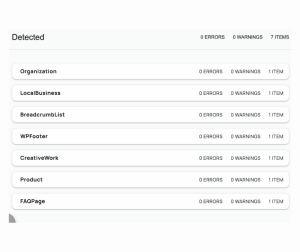
Why It’s a ProblemMagento supports schema markup for products and reviews, but many stores either never implement it or do so incorrectly. Without structured data, your listings in Google lack rich features - such as price, star ratings, and availability. These missing elements can reduce visibility and click-through rates.
How to Fix It- ✔ Implement product schema on product pages: Include attributes like name, description, SKU, offers (price + availability), and reviewRating.
- ✔ Validate markup: Use Google’s Rich Results Test or schema.org to ensure structured data is implemented correctly.
- ✔ Add breadcrumb schema on category pages: Helps Google understand site hierarchy and improves how pages are displayed in search results.
- ✔ Automate with extensions or custom code: Use Magento SEO extensions or custom solutions to generate structured data efficiently, but always verify manually.
Here’s my experience with structured data:
Structured data is free real estate in the SERPs. When implemented correctly, product schema can significantly improve click-through rates and help Google understand exactly what you’re selling, as well as take up more space on the SERP, so make your page look more attractive.
On one recent client project, competitors were showing review stars in shopping search results while my client’s stars weren’t visible. Implementing proper schema made a huge difference - their 5-star ratings started appearing, boosting CTR and EEAT signals.
8. Misconfigured Robots.txt and XML Sitemaps
Why It’s a ProblemIf a Magento store’s robots.txt file is too permissive, Google may crawl and index low-value or filter-based pages. If it’s too restrictive, important pages could be accidentally blocked. Additionally, Magento’s default XML sitemap configuration can include unnecessary variants, parameter URLs, or non-canonical pages. Poor sitemap configuration means search engines may not prioritise the store’s most important content.
How to Fix It- ✔ Review and fine-tune robots.txt: Disallow filter parameter URLs where relevant while ensuring essential pages remain crawlable.
- ✔ Apply noindex, follow where needed: Use this on layered navigation and parameter pages to prevent indexing of low-value URLs.
- ✔ Configure Magento sitemap settings: Include only canonical URLs to ensure search engines see the correct pages.
- ✔ Submit a sitemap index file: Provide a sitemap index in Google Search Console rather than listing every small variant.
- ✔ Audit regularly: Periodically review the sitemap to ensure it’s up-to-date, clean, and focused on priority pages.
Here’s my experience with robots.txt and sitemaps:
On one Magento audit, the sitemap included thousands of parameter URLs while critical category pages were buried. After cleaning the sitemap and adjusting robots.txt rules, Google began crawling and indexing the correct pages, improving visibility and organic traffic.

9. Overlooking HTTPS or Mixed Content Issues
Why It’s a Problem
Security is no longer optional: Google expects eCommerce sites to use HTTPS everywhere. If parts of your Magento store are served over HTTP, or if mixed content issues exist (secure pages loading insecure scripts), it negatively impacts both SEO and user trust.
Canonical tags must also point to HTTPS URLs; otherwise, you risk duplicate content across protocols.
Finally, linking to external sites should always be HTTPS. An HTTP site could expose users to attacks, and even if no sensitive data is transmitted, browsers may flag it as less secure, undermining user trust.
- ✔ Enforce HTTPS site-wide: In Magento, enable “Use Secure URLs” and redirect all HTTP traffic to HTTPS.
- ✔ Update internal links, canonicals, and sitemaps, as well as external links: Ensure all references point to HTTPS versions exclusively.
- ✔ Fix mixed content warnings: Make sure scripts, images, fonts, and CSS are loaded over HTTPS.
- ✔ Monitor after migration: Use Google Search Console to check for indexing or canonical issues following the HTTPS implementation.
Here’s my experience with HTTPS:
On a recent project, external links pointing to HTTP sites caused recurring security warnings and were consistently flagged by auditors like Sitechecker and Semrush; correcting these links not only removed the errors but also improved the site’s overall trust and technical health.

10. Neglecting Ongoing SEO Maintenance
Why It’s a Problem
Magento SEO is not a 'set and forget' task. As new products, categories, or content is added and site architecture evolves, SEO issues can reappear. Without regular audits, technical problems accumulate, leading to long-term performance degradation and lost traffic opportunities.
Similarly, keywords don't reach page 1 and stay there. Your competitors are constantly improving and evolving, so tracking and optimising for keywords is really important. And now, with the rise of GEO, you also have to factor in visibility in LLMs such as ChatGPT and Perplexity. Constantly updating, refreshing, and creating quality content will always be an ongoing task.
- ✔ Schedule regular SEO audits: Conduct quarterly checks for canonical issues, duplicate content, crawl budget waste, sitemap cleanups, and mobile performance.
- ✔ Use crawling tools: Tools like Screaming Frog or Sitebulb help detect indexing and technical issues early.
- ✔ Monitor Google Search Console: Track indexing, coverage, and URL parameter issues consistently.
- ✔ Maintain meta data hygiene: Ensure all new product and category pages have optimised titles and descriptions.
- ✔ Integrate SEO into development: Whenever site changes occur (new filters, product types, or page templates), assess the SEO impact before launch.
- ✔ Hire an SEO expert: Keep your site fresh and up to date with new SEO-lead content. Opt for an agency with strong technical expertise and developers on site, to ensure site health and safety.
Here’s my experience with ongoing SEO:
Magento SEO isn’t a one-off project; it’s a continuous process. If audits are only conducted once every 18 months, you leave substantial gains on the table. Every release, new feature, or campaign should be evaluated for its effect on indexing, speed, and crawlability. Continual optimisation and creation of content is key for visibility in the SERPs and AI.

Will Switching to Hyvä improve my Magento SEO?
In short, yes, switching to Hyvä can improve your SEO by making your site faster, cleaner, and more user-friendly, which boosts Core Web Vitals and crawlability. However, it won’t fix backend SEO issues on its own and won't replace the need for top quality content.
Why Hyvä's Relevant for SEO
Hyvä is a modern front-end theme for Magento that focuses on performance, simplicity, and faster page load times. Switching to Hyvä can significantly improve SEO because Google considers site speed and user experience as ranking factors.
Traditional Magento themes often include heavy JavaScript and complex layouts that slow down page rendering. Hyvä reduces this bloat, meaning pages load faster, Core Web Vitals improve, and users are more likely to stay engaged.
Additionally, cleaner HTML and CSS output can make it easier for search engines to crawl and index your content, reducing the risk of errors and improving overall site health.
- ● Improved page speed: With fewer scripts and optimised rendering, your pages load faster, boosting SEO performance.
- ● Better mobile experience: Hyvä is responsive by default and adheres to modern frontend best practices, which positively affects mobile SEO.
- ● Cleaner markup for crawlers: Reduced DOM complexity helps search engines understand your content more efficiently.
- ● Enhanced developer productivity: With simpler frontend architecture, implementing SEO-friendly changes like structured data, canonical tags, and lazy-loading images becomes easier.
While Hyvä is powerful, it's not a total solution all by itself. It requires a developer familiar with its framework, and some Magento extensions may need custom integration to work with it.
Switching to Hyvä is a frontend migration—it won’t automatically fix backend SEO issues such as duplicate content, URL structure, or HTTPS problems.
My Experience with Hyvä
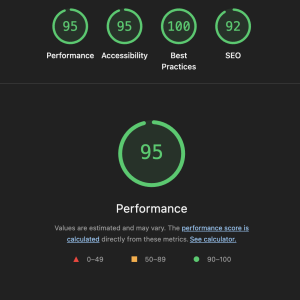
At Envisage Digital, we're Hyvä Gold Partners, so see a lot of clients switching onto the theme. On a recent Magento project, moving to Hyvä reduced page load time by 60%, which improved Core Web Vitals scores and led to noticeable increases in organic traffic.
How To Win at Magento SEO
Magento offers exceptional flexibility and capability — but without a carefully configured SEO approach, many of its advantages can work against you. From URL structure and duplicate content to site speed, mobile experience, and structured data, there are many potential pitfalls.
To succeed, you need both technical diligence and strategic thinking. Enable canonical tags, block or noindex low-value parameter URLs, optimise performance, and maintain a robust internal linking structure. Regular audits and SEO best practices should be baked into your store’s roadmap.
I always say to clients that Magento is only as powerful as you make it for SEO. There’s a lot of features to take advantage of - and working with plugins can help expand your ….. you’ll never truly unlock its organic potential.

Need some Magento SEO help?
If all this sounds a bit overwhelming, don't worry - we're here to help! Get in touch
for a free technical SEO audit and call, where I'll run through what you need to do to make your site technically sound for SEO.
Alternatively, check out our Technical SEO Services
and get in touch to discuss your needs further. I love talking SEO so would be delighted to chat with you!

Latest Posts

Understanding the True Cost of Ownership for Magento
Understanding the True Cost of Ownership for Magento: Why Regular Updates Are Essential. Contact us Magento Support Services...
Read the full blog
eCommerce Award Winners
Envisage Digital Wins Bronze at the eCommerce Awards 2025 with Hyvä site . Contact us Hyvä Themes Home...
Read the full blog
Hyvä Commerce
Hyvä Commerce . Get In Touch Magento Services Hyva Themes Home What is Hyvä Commerce? Hyvä Commerce is...
Read the full blog